OpenWrt Chaos Calmer r46693, kernel 4.1.5
When I try to run the executable file, then an error occurs "file not found". In previous versions of the kernel was no such problem, please help.
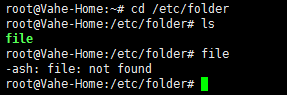
(Last edited by Vahe91 on 22 Aug 2015, 12:31)

The content of this topic has been archived on 3 May 2018. There are no obvious gaps in this topic, but there may still be some posts missing at the end.
OpenWrt Chaos Calmer r46693, kernel 4.1.5
When I try to run the executable file, then an error occurs "file not found". In previous versions of the kernel was no such problem, please help.
(Last edited by Vahe91 on 22 Aug 2015, 12:31)
Try this:
[goflex@GoFLEX:/usr/bin 6%] ~ ls -la file
-rwxr-xr-x    1 root     root         19397 Feb 12  2015 file
[goflex@GoFLEX:/usr/bin 7%] ~ ./file
Usage: file [-bcEhikLlNnprsvz0] [--apple] [--mime-encoding] [--mime-type]
            [-e testname] [-F separator] [-f namefile] [-m magicfiles] file ...
       file -C [-m magicfiles]
       file [--help]
[goflex@GoFLEX:/usr/bin 8%] ~ Try this:
[goflex@GoFLEX:/usr/bin 6%] ~ ls -la file
-rwxr-xr-x    1 root     root         19397 Feb 12  2015 file
[goflex@GoFLEX:/usr/bin 7%] ~ ./file
Usage: file [-bcEhikLlNnprsvz0] [--apple] [--mime-encoding] [--mime-type]
            [-e testname] [-F separator] [-f namefile] [-m magicfiles] file ...
       file -C [-m magicfiles]
       file [--help]
[goflex@GoFLEX:/usr/bin 8%] ~
command ./file does not help to run file
(Last edited by Vahe91 on 22 Aug 2015, 13:43)
use ls -la file to show the complete mode of file.
use ls -la file to show the complete mode of file.
-rwxrwxrwx 1 root root 32375 Aug 22 16:45 file
Looks ok to me.
This makes very little sense. What is "file"? Is it a shell script or a binary? Does it have any contents? The same thing obviously does not occur when you execute cd and ls, which are just executable files on your path.
I'm guessing this is not a valid executable on your system. Read this and report back what you find: http://www.dedoimedo.com/computers/linu … found.html

Did you compile "file" yourself? If so, you should read the documentation about cross-compiling for OpenWrt.
(Last edited by fecaleagle on 22 Aug 2015, 18:28)
This makes very little sense. What is "file"? Is it a shell script or a binary? Does it have any contents? The same thing obviously does not occur when you execute cd and ls, which are just executable files on your path.
I'm guessing this is not a valid executable on your system. Read this and report back what you find: http://www.dedoimedo.com/computers/linu … found.html
Was "file" compiled against glibc? If so, you should read the documentation about cross-compiling for OpenWrt.
Its a kms server. "File" compiled against uclibc. I tried to take the executable file from the folder "static" and it worked.
Its a kms server. "File" compiled against uclibc. I tried to take the executable file from the folder "static" and it worked.
So the statically linked binary does work? If so, OpenWrt was missing one or more dynamically linked libraries, and it was just a misleading error message.
I've not yet needed to cross-compile anything for OpenWrt yet, but I'll keep in mind to statically link in the future when I inevitably do need to compile something that links against non-standard libraries.
(Last edited by fecaleagle on 22 Aug 2015, 18:58)
Vahe91 wrote:Its a kms server. "File" compiled against uclibc. I tried to take the executable file from the folder "static" and it worked.
So the statically linked binary does work?
yes, it works fine
The discussion might have continued from here.