OpenWrt Forum Archive

Topic: MR3020 - Select mode: Access Point, Client, Ad hoc ...

The content of this topic has been archived on 27 Apr 2018. There are no obvious gaps in this topic, but there may still be some posts missing at the end.

Hi Friends,

I installed the Chaos Calmer 15.05.1 in a TL-MR3020, without problem.

Set the root password and activated the wifi.

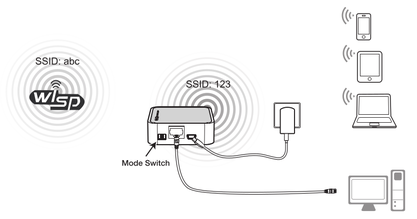
I would like to configure the router to act as a WISP, and share Internet access according to the diagram:
www.c2o.pro.br/proj/openwrt/figuras/modo_wisp.png

I will not use a 3G USB modem because I intend to use USB port to connect an Arduino board in future.

Now I am confused about how to select the mode in General Setup.

There are several options:
Access Point
Client
Ad hoc
802.11s
Pseudo Ad-Hoc (ahdemo)
Monitor
Access Point (WDS)
Client (WDS)

Where can I find information to understand these different options?

There is also a switch outside of the box with the options, 3G/4G, WISP and AP.

Any tips?

Thank you,
Markos

markos wrote:

<snip>
Where can I find information to understand these different options?

www.duckduckgo.com

You want client on the WAN side to connect to a hotspot\STAtion
You want AP on the client side to connect to your devices
The switches on the outside of the box will, generally by default, have no function in OpenWrt, but if you look at the device's wiki you may be able to configure them
You want to search and read the wiki https://wiki.openwrt.org/start
You want to ignore Max

RangerZ wrote:

You want client on the WAN side to connect to a hotspot\STAtion

Incorrect. WAN is generally understood to be an Ethernet port on the switch. hotspots are wireless and implemented as APs.

RangerZ wrote:

You want AP on the client side to connect to your devices

Incorrect (and convoluted). 'devices' (STAtions) connect to (associate with) APs. Analogous to the client & server model (be so kind to use the correct terminology for hardware and software).

RangerZ wrote:

The switches on the outside of the box will, generally by default, have no function in OpenWrt, but if you look at the device's wiki you may be able to configure them

Again, a forum member misuses and abuses terminology. box = device (not the device carton).

RangerZ wrote:

You want to search and read the wiki https://wiki.openwrt.org/start

Or www.duckduckgo.com.

RangerZ wrote:

You want to ignore Max

Rich, this set of (de)structions offered by a forum member that has demonstrated the inability to follow directions.

N.B. - describe the requirement(s) and answers, some incomprehensible, will follow

Max Hopper wrote:

Incorrect (and convoluted).

Excuse me for laughing at you calling someone else's style "convoluted". Your replies contain more markup than a typical 1998 corporate website. This time you actually managed to include all three of the emphasis options this forum allows. And let me tell you, it doesn't make your posts any clearer to understand.

Can you please knock it off, trying (and failing) to look smarter than everyone else by harping on semantics, answering all but the simplest questions (one has to notice you never pick more advanced topics) as cryptic and aloof as possible, and generally being a dick about everything? The overall goal of this forum is to help people, and if you're trying to do that you're clearly doing it wrong. Both of you.

(Last edited by metai on 6 Aug 2016, 14:11)

markos wrote:

I would like to configure the router to act as a WISP, and share Internet access according to the diagram:
www.c2o.pro.br/proj/openwrt/figuras/modo_wisp.png
(...)
Now I am confused about how to select the mode in General Setup.

This looks like a regular "Access Point" setup. The diagram is a little bit confusing because typically, the wired port receives the network uplink from a modem or another router/switch, not a desktop computer as pictured.

Setting up an Access Point on a single-port device is not as straightforward as with devices that have both WAN and LAN ports. See https://wiki.openwrt.org/doc/recipes/singleportrouter for details (and, for the moment, a link to another page that explains the process).

(Last edited by metai on 6 Aug 2016, 14:05)

@metai.  I interpret the diagram differently.  I see the devices on the right being all clients and the Ethernet as a LAN port, not a WAN port.  I also read the SSID: abc to be the STAtion\client on wwan.  I think this makes the device a basic router. 

If so then to connect, from a scan, one should disable the "Replace wireless config " checkbox, enter the "WPA passphrase" (WISP password) and keep all the other defaults, including "client" on the second page, the same.

To directly answer the OPs initial question, I am not aware of a specific page that clarifies all the terms.  You will find some docu here,  https://wiki.openwrt.org/doc/uci/wireless but it does not truly answer the question.

I apologize to the op for my curt reply.

RangerZ wrote:

@metai.  I interpret the diagram differently.  I see the devices on the right being all clients and the Ethernet as a LAN port, not a WAN port.  I also read the SSID: abc to be the STAtion\client on wwan.  I think this makes the device a basic router.

By that logic it would have WWAN, and the whole thing would even be simpler to achieve than an Access Point on a one-port device. I think the OP should describe in his own words what he wanted to achieve, otherwise we'd just be guessing.

Dear Friends,

The diagram I used
www.c2o.pro.br/proj/openwrt/figuras/modo_wisp.png]www.c2o.pro.br/proj/openwrt/figuras/modo_wisp.png]www.c2o.pro.br/proj/openwrt/figuras/modo_wisp.png
was taken from quick installation guide from TP-Link.

My intention is to use the router to allow internet connection for multiple devices (laptop, tablet and mobile), but in case there is no main router for Internet access, it should allow connection of devices on a wireless LAN.

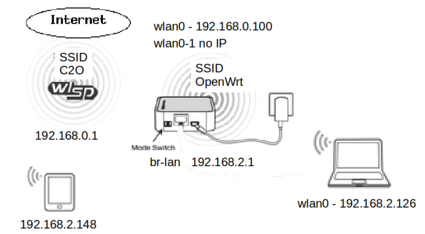
I followed some tutorials, but still very insecure and with many doubts I made the router to connect to a primary router for Internet access (in client mode):
www.c2o.pro.br/proj/openwrt/figuras/modo_client_01.png]www.c2o.pro.br/proj/openwrt/figuras/modo_client_01.png]www.c2o.pro.br/proj/openwrt/figuras/modo_client_01.png

and share access with other devices (in access point mode):
www.c2o.pro.br/proj/openwrt/figuras/modo_client_access_point.png

I tried to share the steps I followed (in Portuguese):
www.c2o.pro.br/proj/openwrt/ar01s02.html

It is not a reference material because I have limited knowledge about networks but it was an effort to help other beginners like me.

I intend to ask for help in this forum to improve the settings and to solve future questions.

Thanks for your attention.

Best Regards,
Markos

well ive done this before what ive done is

1. setup a client mode wifi all you have to do is scan for your WISP SSID broadcast and connect to it.
2. once youre connected to your WISP you need to register that as a WAN connection so edit or create a new interface and select the interface of the wireless client. Set the firewall to WAN and after that your WAN interface should get a IP from your WISP provider.
3. at this point you should have a internet connection if youre connected to your router wired.
4. to make a AP just go to wifi and create a new wireless AP and make sure to include that new wifi interface to your br-lan interface or whatever your local network interface is.

Hi,

Trying to understand the operating mode(s) of OpenWrt I found a tutorial (original in Portuguese) that helped me to understand some concepts and I decided to share it in the forum:

(Source: http://luizluca.blogspot.com.br/2012/01 … ador.html)

"...
During configuration of OpenWRTwe do not see the usual Linux interfaces (eth1, wlan0, ...). What we find are interfaces of "higher level" as LAN and WAN. These interfaces can be mapped directly to a single router interface (now yes eth0, etc.) or joining them into a bridge. By default, there are two interfaces: WAN (Wide Area Network) and LAN (Local Area Network). The WAN is usually composed only of an interface (eth1), usually detached from other ports used to connect to the Internet. The LAN is a bridge that joins the eth0 (LAN ports) and the wireless interface (wlan0). In general, it does not change the LAN, and WAN operates configured by DHCP, PPPoE, depending on your Internet provider.

OK, so far as any router. But now comes the flexibility of OpenWRT. The functions of the interfaces can be: modified switched, joined, or divided as the administrator wants.

The wlan0 interface can join with the WAN, the LAN ports may be used for multiple connections to the Internet or put it all together and make the router a single point of access (access-point) without any routing. Someone might ask, "but the ports of the local network, those 4 are mapped to a single interface, eth0?". Yes, they are. But this is not a limitation. Although, by default, they are together, the ports, if the HW permits, can be isolated in several networks send packets with VLAN tags, and so on.

And what about the operating modes. There is a good range of operating mode options from the classic "AP", through the simple Ad-hoc and more interesting things like mesh networking (802.11s), WDS client or server, or even behaving like a of wireless client common, connecting to another wireless router. There is also the mode "monitor" to perform capture of wireless packets.

Another interesting thing may not be noticed. In setting the Wifi there is a button to "Add."

Add what?

Another wireless configuration. If the HW enable, and usually allows, you can have multiple wireless network settings, operating in different ways, with different passwords with different SSID, each representing an interface.
..."

(Translated with Google Translator)

Many thanks for attention,
Markos

The discussion might have continued from here.